

 Seun · São Paulo
Sarah waited
4h 12m
for a reply to “I can’t log in.”


Customers write on your website. Your team answers from Slack or Discord. The AI takes the easy ones and hands over the rest with the whole story.
Free for 50 conversations a month · no card · set up in about 4 minutes
Customers write on your site or by email. Your team answers in the chat app they already use.
Join the waitlistFree for 50 conversations a month · no card
The problem · a normal Tuesday
Support lives in a tab nobody opens.
Sarah waited
4h 12m
for a reply to “I can’t log in.”
Maya switched tabs
140×
between Slack, the helpdesk and the docs.

Kai paid for
26 seats
Four people logged in.

The problem · a normal Tuesday
Close 13 tabs. Keep one thread.
Sarah waited
4h 12m
for a reply to “I can’t log in.” She tried again on Discord. Nobody saw that either.
Maya switched tabs
140×
between Slack, the helpdesk and the docs. The answer was already in a Slack thread.
Kai paid for
26 seats
in the helpdesk. Four people logged in this month.
How it works
01of 05
The widget wears Acme’s colours. She stays on the page and never has to log in.
acme.com · widget
"I can't log in. Reset my password twice and it still says invalid."
02of 05
A thread opens in Slack, Discord or Telegram with her history attached. Nobody copies anything over.
 #support · Acme HQ
New ticket #1042 · Sarah Okoye
3rd ticket · Pro plan · Lagos
03of 05
It reads your help docs and past tickets. 61% isn’t enough, so it hands over instead of guessing.
Thought for 1.4s · read 3 help articles
61% sureline is 72%
Not sure enough, so Maya gets it with a summary.
04of 05
Maya reads a three-line summary, not the whole thread. Her reply lands on acme.com with a ✓.
 Maya Chen · in the thread
"Your company switched to SSO yesterday. Use Continue with Google and you're in."
✓ Sent to Sarah on acme.com

05of 05
Maya’s fix becomes a lesson. Kai taps approve, and the next Sarah gets her answer in six seconds.
New lesson · from ticket #1042
SSO workspaces: send people to "Continue with Google". Password resets won't work.
Approved by Kai · accuracy 84% → 91%

How it works
01/ 05
The widget wears Acme’s colours. She never leaves the page, and nobody asks her to log in.
02/ 05
A thread opens in your team’s chat app with her history attached. Nobody copies anything over.
03/ 05
It reads your help docs and past tickets. 61% sure isn’t enough, so it hands over with a summary instead of guessing.
04/ 05
Maya reads a three-line summary, not the whole thread. Her reply lands on acme.com with a ✓.
05/ 05
Maya’s fix becomes a lesson. Kai taps approve, and the next Sarah gets her answer in six seconds.
Platforms
Same commands, same buttons, same summaries on every platform. Switch tabs and watch the same ticket land.
RelayHelp shows up as an app in the tool your team already has open. Same commands, same summaries, wherever they work.
SlackThreads in #support, slash commands, App Home DiscordForum posts or threads, role-based access
 TelegramA private group with topic threads
#support· thread · #1042
RelayHelpAPP14:24
Sarah · widgetEmail. Same error after the reset link.
RelayHelpAPP14:24
Maya pinged @Priya. Here's the short version:
• Sarah can't log in after two resets
• Okoye Studio may have turned on SSO
• Nothing promised to Sarah yet

Priya Rao14:25
Yes, yesterday. Passwords are off for them.
RelayHelpAPP14:26
Suggested reply · only you see this
Found it. Your company switched to SSO yesterday. Use "Continue with Google" and you're in.
SendEditIgnore
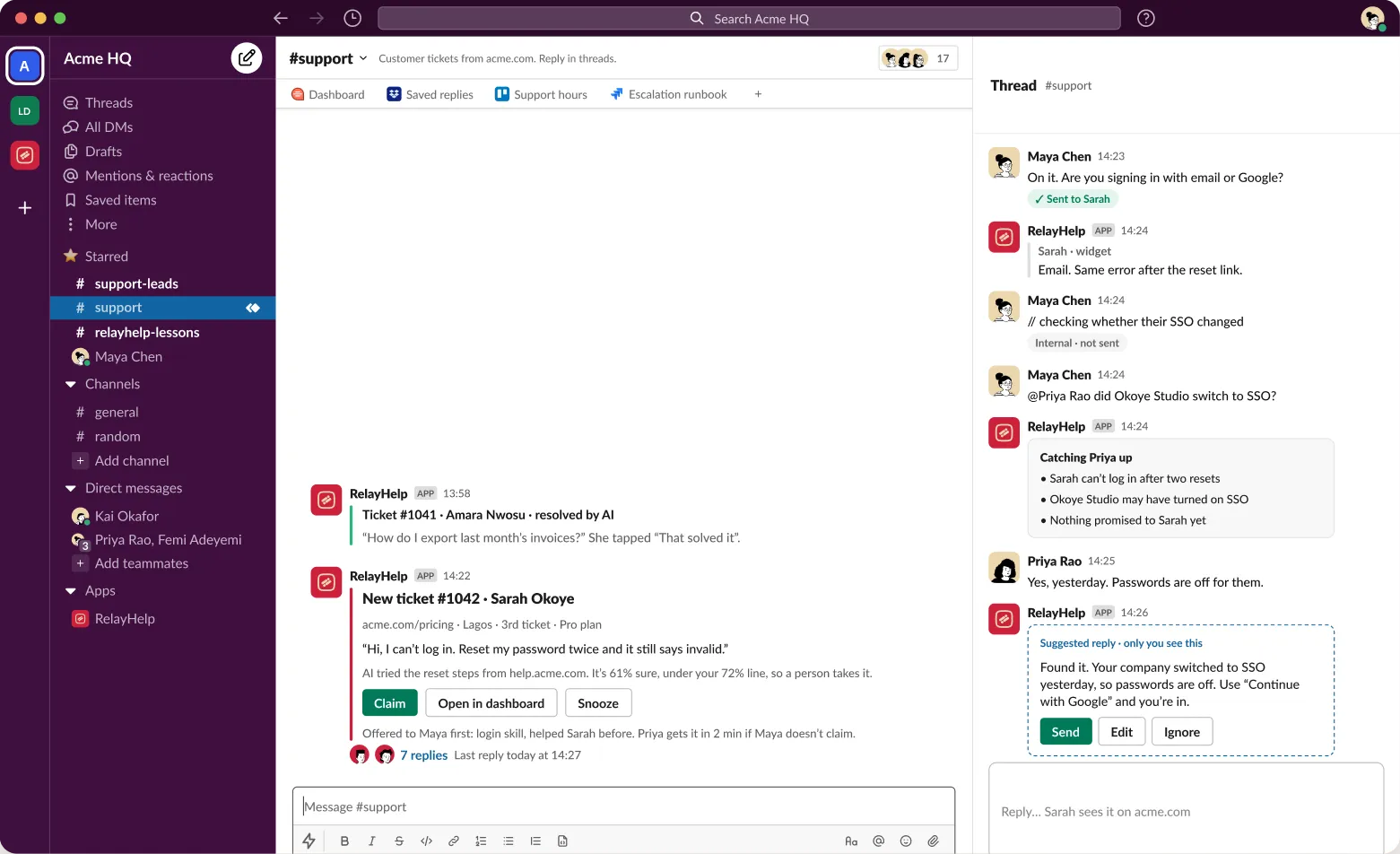
✓ means Sarah saw it
// keeps it internal
Summary posts before you jump in
One tap to claim
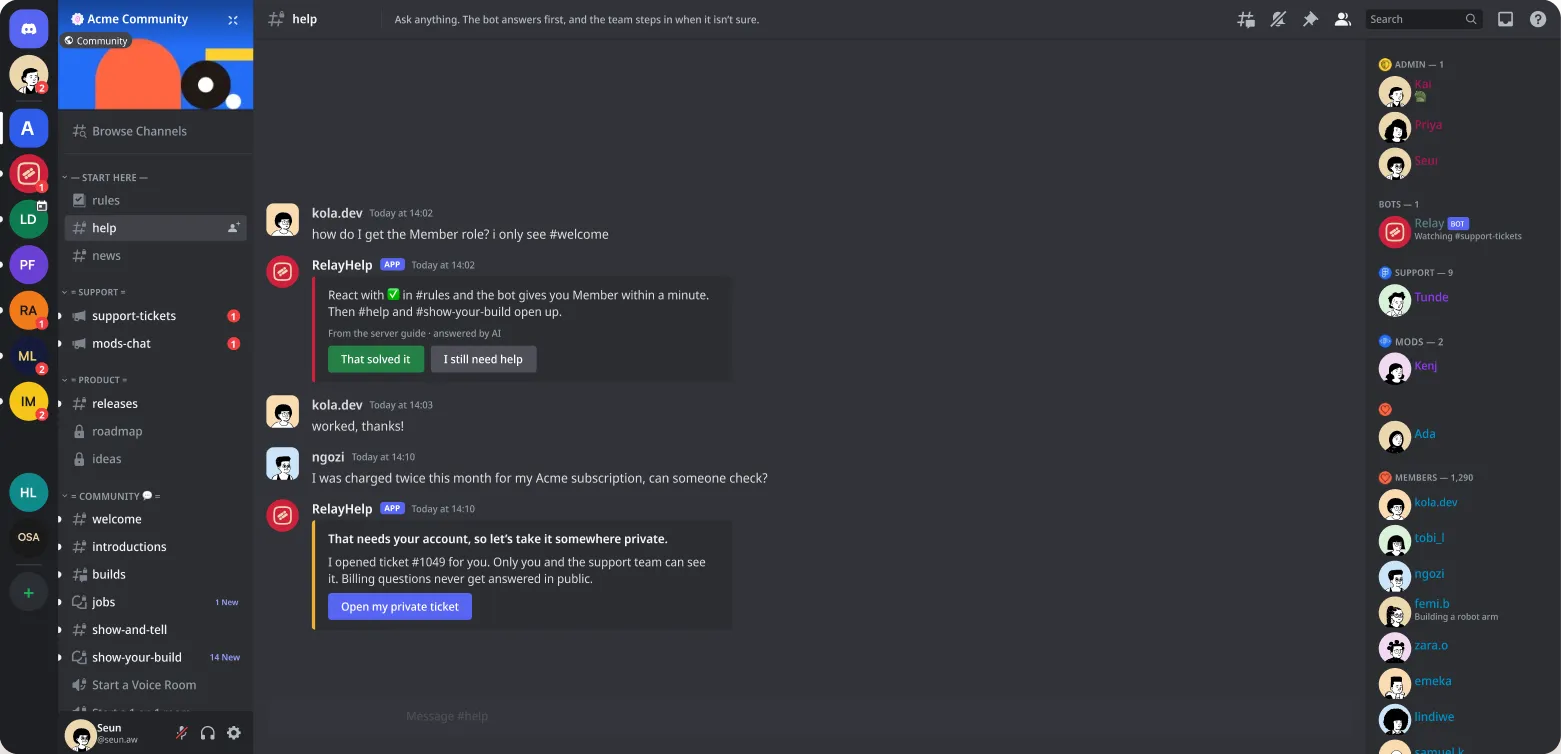
Acme support· group · #1042
RelayHelpAPP14:24
Sarah · widgetEmail. Same error after the reset link.
RelayHelpAPP14:24
Maya pinged @Priya. Here's the short version:
• Sarah can't log in after two resets
• Okoye Studio may have turned on SSO
• Nothing promised to Sarah yet
Priya Rao14:25
Yes, yesterday. Passwords are off for them.
RelayHelpAPP14:26
Suggested reply · only you see this
Found it. Your company switched to SSO yesterday. Use "Continue with Google" and you're in.
SendEditIgnore
Around the clock
AI answers what it knows at 3 am. Anything it’s unsure of waits in a queue with a summary, and the first agent online picks it up with the context already written.

Lagos
asleep · Maya
Maya · asleep

London
asleep · Kai
Kai · asleep
Austin
on call · Priya
Priya · on call
 Answered by AI in 6s
Manila
customer · Kemi asks
Kemi · asking
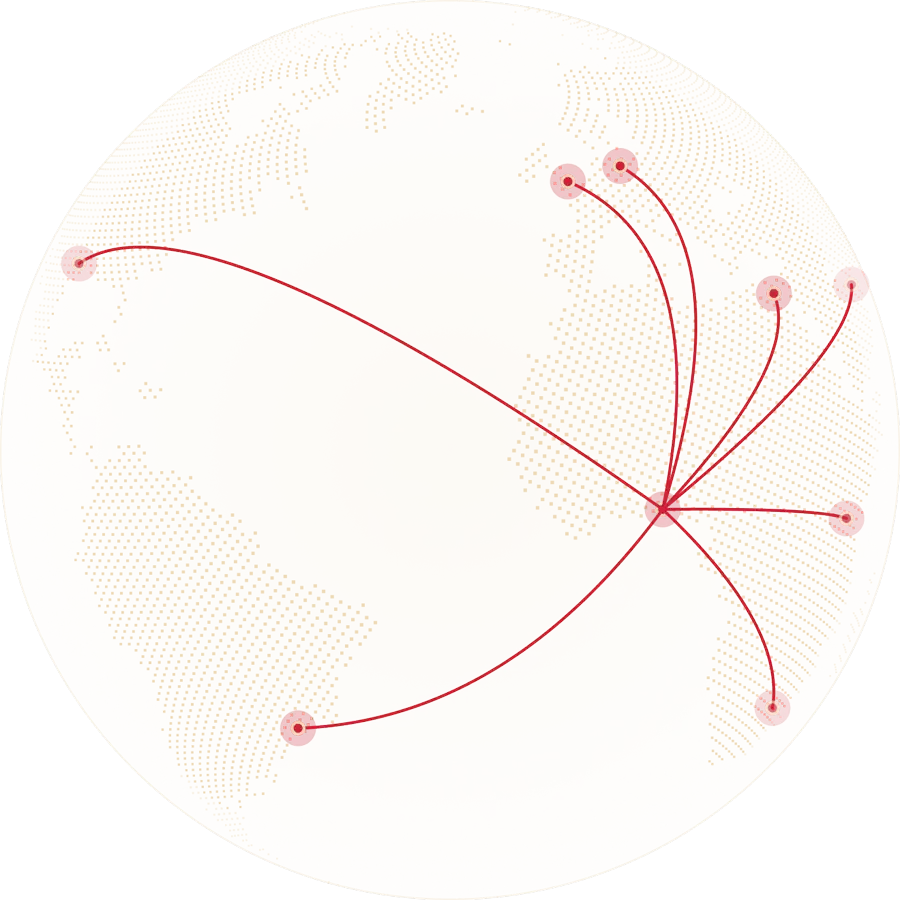
Kai · London · asleep
Maya · Lagos · asleep
Seun · São Paulo · asking
AI answers · 14 solved · 3 queued
Team online · Lagos and London
AI first, agents on call
0003060912151821The teach loop
Type /wrong under a bad answer. RelayHelp drafts a lesson from your fix, an admin taps approve, and the next customer gets the right answer.
Type /wrong under a bad answer. An admin taps approve. The next customer gets it right.
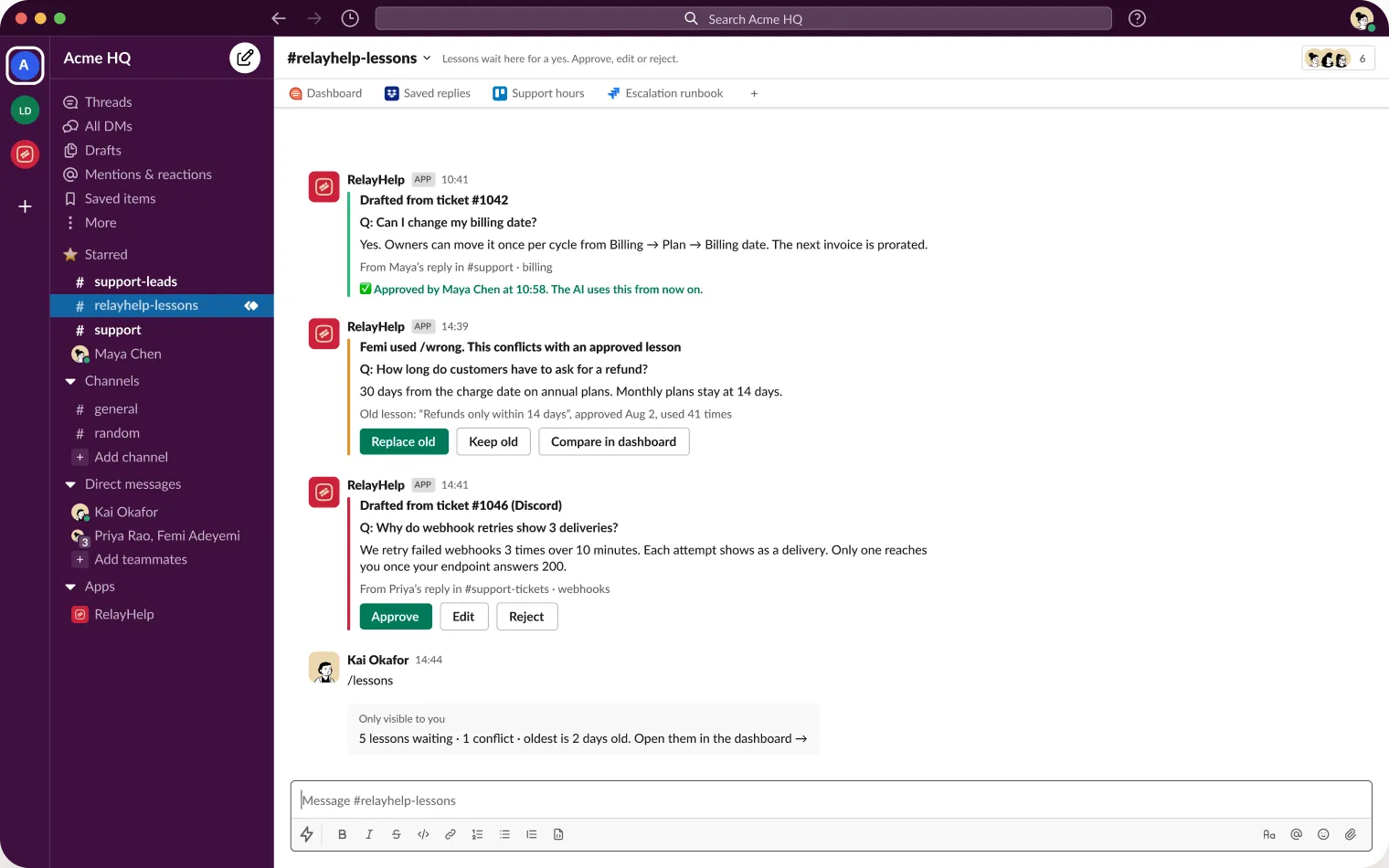
From a resolved thread in #support · ticket 4821Billing
Q: Can I change my billing date?
Yes. Owners can move it once per cycle from Billing → Plan → Billing date. The next invoice is prorated, and the change shows on the invoice PDF.
Approved by Maya · the AI uses this from now on
 AI drafted this from Maya’s reply · 4 min agoUndo
AI accuracy
84% → 91%
AI accuracy
84% → 91%
6 weeks · 23 lessons approved
What teams see in month one
6s
median first answer
AI replies before most people finish typing
91%
AI accuracy
after 23 approved lessons
2 min
handoff to a human
summary already written
0
new tabs for agents
they stay in Slack or Discord
Numbers from the Acme HQ demo workspace. Your own dashboard shows yours from day one.
Demo workspace numbers.
Pricing
Add your whole support team for free. You pay for conversations and AI credits, so hiring three more agents never changes the bill.

Start here
$00foreverforever
50 conversations a month
50 conversations is about two a day.Upgrade any time. Your history comes with you.

Most teams
$4941a montha month, billed yearly
1,000 conversations a month
Free for 14 days. No card.Most teams pick Pro.

Multi-platform
$149124a montha month, billed yearly
5,000 conversations a month
26 agents on a $50 seat = $1,300 a month.Team stays at $149, however many people help.
Go over your limit and every message still arrives in Slack or Discord. AI answers pause and your team replies by hand until you top up or the month resets.
Compared
Agents answer from
RelayHelpSlack or Discord
1 of 6 · swipe for setup, pricing, AI learning…
Customers reach you on
RelayHelpWidget, email, Discord
2 of 6
AI learns from fixes
RelayHelp/wrong, then approve
3 of 6
Handoff context
RelayHelpSummary posted first
4 of 6
Pricing
RelayHelpPer workspace
5 of 6
Setup
RelayHelpAbout 10 minutes
6 of 6
Already on a helpdesk? Keep it for email. RelayHelp can push tickets to it over webhooks while your team answers from chat.
Questions
No. Admins use the dashboard. Agents get an invite link, join the Slack channel or Discord role, and work from there.
It stays quiet in public, tells the customer a person is coming, and posts a ticket with a summary for your team.
Anything starting with // stays inside your workspace. Only plain replies relay to the customer.
Your docs, files you upload, and lessons your admins approve. Nothing from other workspaces.
Yes. Tickets, transcripts and lessons export as CSV or JSON from Settings, any time.
Connect Slack or Discord, invite your team, and answer your first ticket in about ten minutes.
Connect your chat app and answer your first ticket in about ten minutes.